


In this article
What if your crowdfunding success didn’t have to end when the campaign timer hit zero? What used to be called Indiegogo InDemand was built exactly for that, turning a one-time funding push into an extended sales and pre-order phase.
Today, that model has changed. After Indiegogo’s overhaul, InDemand evolved into Late Pledge and Pledge Manager, a structured system for continuing sales after your campaign ends.
Whether you’ve just wrapped up a successful Indiegogo campaign or want to transfer from Kickstarter, this post-campaign phase can help you capture late demand, recover missed orders, and extend your revenue window beyond launch.
But is it the right choice for your campaign? In this guide, we’ll break down the benefits and challenges of Indiegogo Late Pledge, walk you through how to set it up, and share expert strategies to keep your campaign profitable for the long haul.
[[cta2]]
What Is Indiegogo Late Pledge and How Does It Work?
Indiegogo InDemand is still widely used as a term, but on the current platform, it no longer exists as a standalone campaign type. What creators used to call InDemand is now part of a structured post-campaign system made up of two phases: Late Pledge and Pledge Manager.
Here’s how it works in practice.
Late Pledge sits between your campaign and full ecommerce, acting as a bridge while you finalize production, pricing, and fulfillment.
After your crowdfunding campaign ends successfully, your project doesn’t immediately switch into an “always-on” sales mode. Instead, it moves through a transition period where payments are finalized, followed by an optional Late Pledge phase that allows you to continue accepting new orders.
Late Pledge functions as your post-campaign sales window. You can accept new backers and allow existing ones to upgrade their pledges, but shipping details and final order information are not collected at this stage. Late Pledge can run indefinitely, but Indiegogo may prompt you to transition to Pledge Manager as you approach fulfillment.
That happens in the next phase, Pledge Manager. This is where your campaign starts to behave more like a structured checkout system, collecting shipping addresses, taxes, and final payments while still allowing controlled access to new buyers.
A few things that have changed compared to the old InDemand model:
- Your campaign does not automatically transition into Late Pledge. You need to select the next phase, complete setup steps, and go through a review process before launching it.
- There is typically a payment collection period after your campaign ends, which can last up to 15 days while failed payments are retried. This creates a short gap before post-campaign sales fully reopen.
- The system is no longer “no rules, no timeline.” It’s a staged lifecycle with defined phases, controls, and platform oversight.
From a practical standpoint, this means Indiegogo is no longer acting like a simple “leave your campaign live forever” tool. Instead, it gives you a structured way to continue selling, manage orders, and transition into fulfillment without immediately moving to a separate ecommerce platform.
Benefits and Challenges
Late Pledge is a great way to keep raising funds and selling your product after a successful crowdfunding campaign, but it’s not for everyone. Here’s what to consider before diving in.
Benefits
- Extended revenue window. Late Pledge allows you to keep accepting new orders after your campaign ends, giving you a second wave of sales from people who missed the launch or needed more time to decide.
- Recover lost and incomplete orders. The post-campaign system makes it possible to capture failed or delayed payments from your original campaign, which can quietly add meaningful revenue without additional acquisition costs.
- Built-in social proof. Your campaign’s funding total, backer count, and updates remain visible, which helps reduce friction for late buyers who want reassurance before purchasing.
- Structured path to fulfillment. With Pledge Manager, you can collect shipping details, taxes, and finalize orders in a controlled way, instead of juggling spreadsheets or moving everything off-platform immediately.
- Flexible marketing window. Without a hard campaign deadline, you can continue running ads, influencer collaborations, and email campaigns, focusing on product value, proof, and delivery timelines instead of urgency alone.
Challenges
- Platform control and review steps. You don’t have full control over every phase. Moving into Late Pledge requires setup and approval, and certain transitions, like closing phases, can involve platform oversight.
- Less urgency. Without a deadline, backers might not feel as much pressure to buy right away. You’ll need to create incentives like limited-time perks or exclusive offers.
- Ongoing marketing is a must. Crowdfunding campaigns naturally build hype, but Late Pledge requires continuous promotion to keep sales going.
- Fulfillment never stops. Unlike crowdfunding, where you fulfill all orders at once, Late Pledge means you’ll need a plan for handling ongoing shipments and inventory.
So Is Late Pledge Right for You?
Late Pledge is likely a good fit if:
- Your campaign funded successfully and demand is still coming in
- You have ongoing marketing capacity: ads, email, or influencer partnerships
- You need more time before you're ready to move to a full ecommerce store
- You want a structured way to recover failed payments and capture late buyers
It may not be the right choice if:
- Your campaign relied heavily on deadline urgency to convert buyers
- You don't have the resources for ongoing marketing and fulfillment
- You're ready to move directly to your own ecommerce store
For example, a smart home device that raised $500K on Kickstarter but still has strong organic traffic and press coverage is a natural candidate, Late Pledge lets the creator keep capturing orders while production ramps up, without rushing into a full ecommerce build. A simpler product with a one-time launch push and no ongoing marketing plan, on the other hand, might be better served by wrapping up and fulfilling directly.
Fees and Costs
Late Pledge uses the same fee structure as a live Indiegogo campaign, and this applies whether your campaign originally launched on Indiegogo or was transferred from Kickstarter.
- 5% platform fee plus ~3% + $0.20 per transaction,
While the percentages stay the same, how they affect your margins can vary. Smaller orders and add-ons are impacted more by the fixed fee, and refunds typically don’t return processing costs, which can reduce your net revenue over time.
How to Set Up a Late Pledge Campaign
So, you’ve decided to go with Late Pledge, now it’s time to set it up for success. Whether you’re continuing from an Indiegogo campaign or transferring from Kickstarter, getting the setup right will make all the difference in keeping momentum and driving long-term sales.
The setup isn’t automatic anymore, and the timing matters more than most founders expect.
Here’s how it actually works.
For Indiegogo Campaigns
If you launched on Indiegogo and successfully funded your campaign, your project doesn’t immediately roll into Late Pledge.
Instead, it goes through a short transition period:
1. Payment collection period begins
Once your campaign ends, Indiegogo starts collecting payments from backers. This period can last up to 15 days, during which failed payments are retried and backers can update their payment details.
2. Choose your next phase
After your campaign ends, you’ll need to select what comes next, Late Pledge or Pledge Manager, from your creator dashboard.
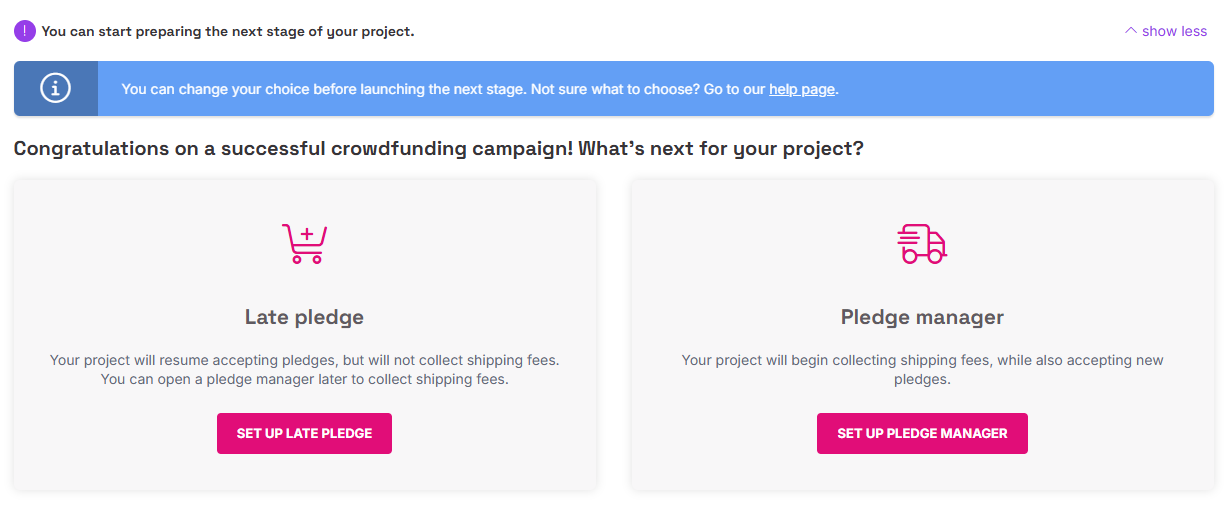
This is not automatic. You’re actively moving your project into the next stage.
3. Complete setup and submit for review
Before launching Late Pledge, you’ll need to complete a checklist inside your dashboard. This typically includes updating your campaign details, confirming timelines, and preparing your page for post-campaign buyers.
Once everything is ready, you submit your project for review.
4. Launch Late Pledge
After approval, your Late Pledge phase goes live, allowing you to accept new orders and continue selling.
If timing is critical, you can request a shorter payment collection window through support. Keep in mind that doing this may reduce the number of recovered payments from your original campaign.
For Kickstarter & Other Platforms (Manual Transfer)
If your campaign launched on Kickstarter or another platform, you can still continue selling on Indiegogo, but the process has changed significantly.
Here’s how the process works today.
1. Create an External Campaign inside Indiegogo
Inside your creator dashboard, start a new project and select the option for an External Campaign.
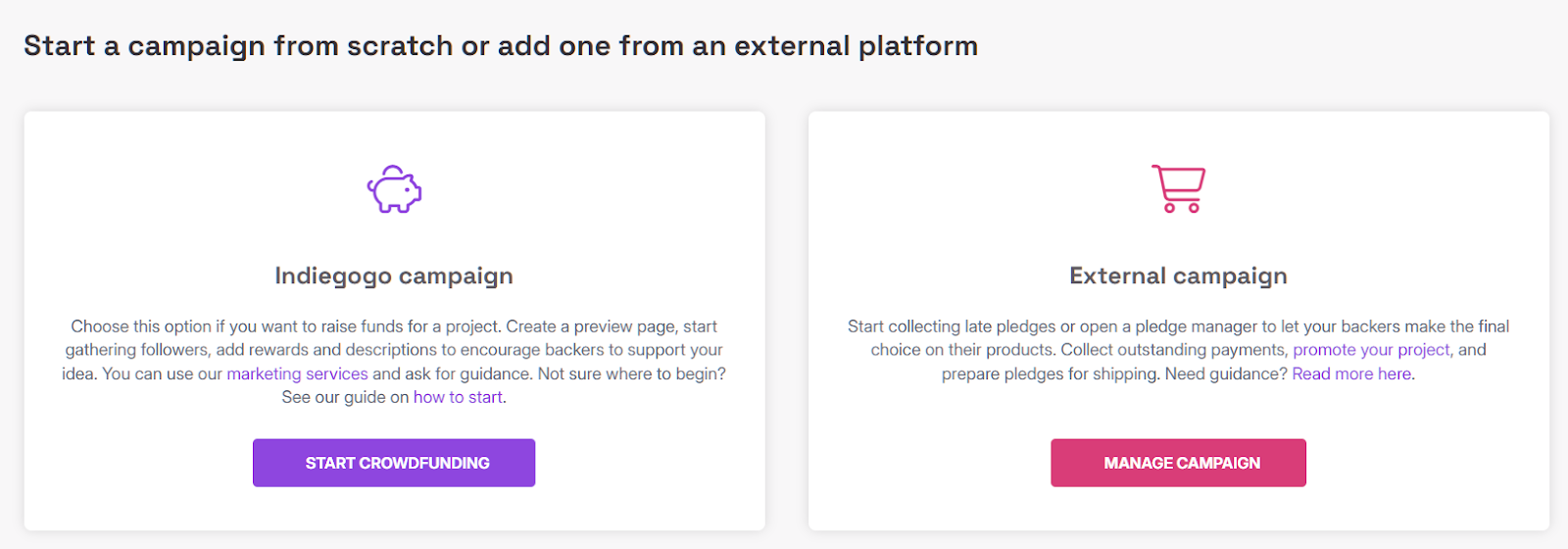
You’ll be asked to provide:
- Your original campaign link (Kickstarter or other platform)
- Total funding and number of backers
- Campaign currency
- Your legal entity details
This step connects your previous campaign data to your Indiegogo project.
2. Choose your post-campaign phase
During setup, you’ll choose how you want to continue:
- Late Pledge if you want to keep accepting new orders
- Pledge Manager if you’re ready to collect shipping details, taxes, and finalize orders
In many cases, creators start with Late Pledge, then move into Pledge Manager once they’re closer to fulfillment.
3. Set up your project and import backers
You’ll complete your campaign setup inside the dashboard, including:
- Updating your campaign page for post-campaign buyers
- Importing your existing backers
- Segmenting them (for example, original backers vs late buyers)
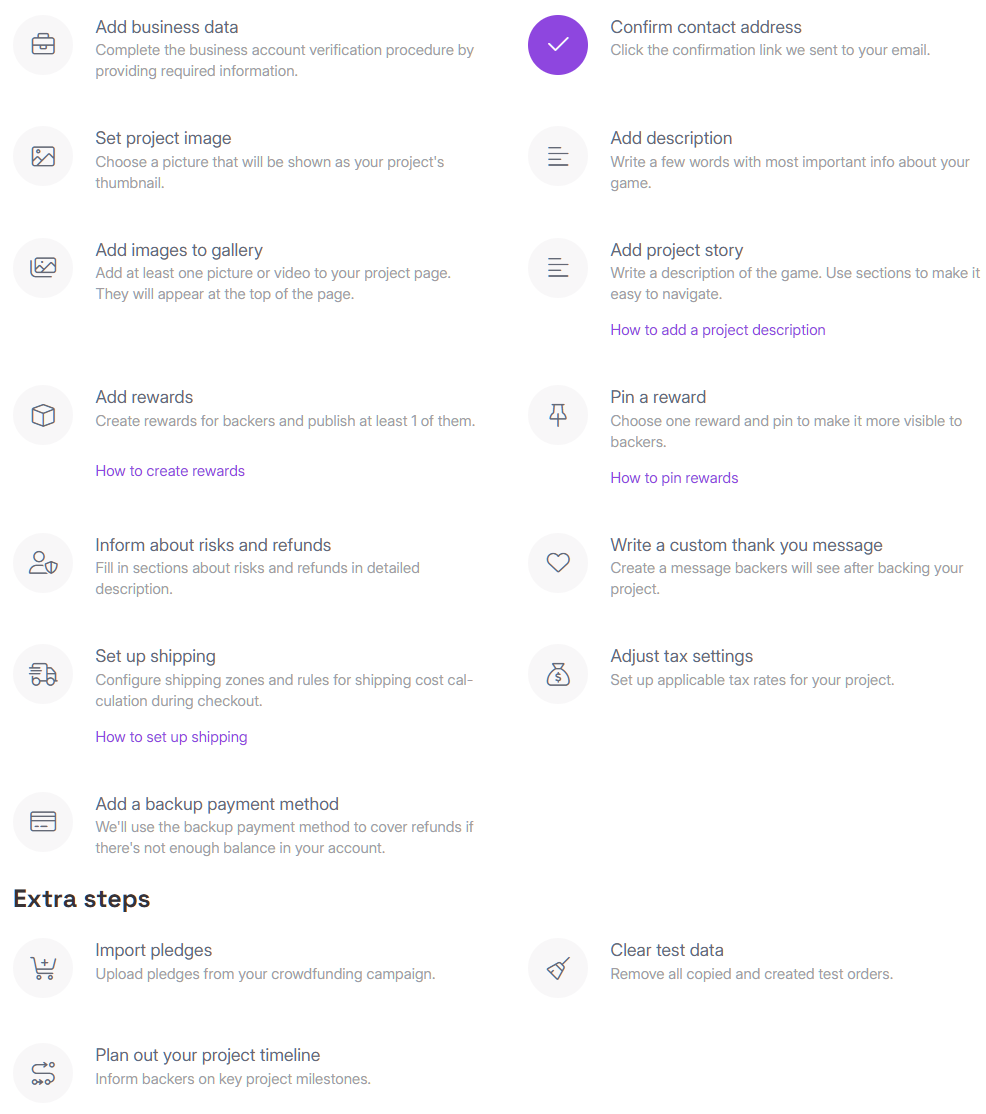
This step is critical for maintaining continuity and communicating with your audience.
4. Submit for review
Once your setup is complete, you’ll submit your project for approval.
Indiegogo reviews external campaigns to confirm eligibility and compliance. This typically takes a few business days, but timing can vary depending on the project.
5. Launch Late Pledge or Pledge Manager
After approval, your project goes live in the selected phase, allowing you to continue accepting orders and managing post-campaign operations.
Important things to know
- External campaigns are supported, but not frictionless. Expect setup work and approval steps.
- Running campaigns on multiple platforms at the same time can lead to rejection or removal, Indiegogo explicitly discourages this.
- Some features may be limited compared to campaigns originally launched on Indiegogo.
How to Optimize and Promote Your Late Pledge Campaign
Getting your campaign live on Indiegogo Late Pledge is just the beginning. Unlike traditional crowdfunding, where urgency drives pledges, Late Pledge requires ongoing marketing and optimization to keep sales coming in. Here’s how to make the most of it.
1. Update Your Campaign for Long-Term Sales
A successful crowdfunding campaign isn’t necessarily optimized for long-term pre-orders. Your Indiegogo Late Pledge page needs to be structured more like an ecommerce storefront than a fundraising pitch.
- Refine Your Messaging:
Move away from urgency-driven language like “Only X days left!” and focus on product value, availability, and why buyers should get in now.
- Rework Your Perks:
If your original perks were time-sensitive or limited to backers, introduce new bundles or add-ons that appeal to a broader audience.
- Keep the Page Fresh:
Update images, product descriptions, and campaign updates regularly so potential buyers see that the product is still active.
- Showcase Social Proof:
Feature backer testimonials, media mentions, and milestones to reinforce trust and credibility.
2. Drive Traffic from the Right Channels
Late Pledge traffic isn’t one audience, it’s two very different ones, and treating them the same usually kills performance.
- Recover unpaid and dropped pledges
Some of your highest-intent buyers never completed their orders. With Indiegogo’s post-campaign system, many of them can still complete their pledges later.
Target them with:
- Reminder emails
- Retargeting ads
- “Complete your order” messaging
This is often the highest ROI traffic you have.
- Acquire new late buyers
These people behave like ecommerce customers. They need stronger proof, clearer positioning, and less assumption of context.
Focus on:
a. Social Media:
A natural way to keep your product in front of people who showed interest during your initial campaign. Focus on platforms where your audience is most engaged.
b. Paid Ads:
Retargeting previous visitors and reaching lookalike audiences through Meta and Google Ads can bring in highly qualified traffic. Since urgency is lower, ads need to emphasize product value and benefits. You can see how this played out in our Circular Ring 2 ads strategy.
c. Influencer Collaborations
Partnering with influencers or niche creators can help tap into an already engaged audience that trusts their recommendations. This can be more effective than direct ads since buyers see real-world use cases.
d. Email Marketing:
Your existing backers are your biggest supporters. Regular updates, exclusive offers, and product news can keep them engaged and encourage repeat purchases.
e. Redirect Traffic from Your Original Campaign:
If your crowdfunding campaign ran on Kickstarter or a different platform, update your old campaign page, social media links, and ads to point to your Indiegogo Late Pledge page. This ensures that anyone discovering your past campaign can still place an order.
Instead of relying on one channel, the best results come from combining multiple strategies to drive consistent traffic and keep your campaign visible.
3. Create Urgency Without a Countdown Clock
One challenge with Late Pledge is the lack of a natural deadline. Without a time limit, many potential buyers put off purchasing. You’ll need to create urgency in other ways.
- Limited-Time Rewards – Offer rewards for a set period to encourage immediate action.
- Low Inventory Alerts – If applicable, highlight when certain items are close to selling out.
- Exclusive Offers – Give early Late Pledge buyers access to bonuses or discounted pricing that won’t be available later.
While you don’t want to create false urgency, strategic scarcity can nudge hesitant buyers to act sooner rather than later.
4. Keep Your Backers Engaged and Involved
Your existing backers are already invested in your success. Keeping them engaged encourages repeat purchases and increases the chances of word-of-mouth referrals and organic exposure.
- Post Regular Updates: Let backers know about production progress, shipping timelines, and any new developments.
- Launch New Rewards or Add-Ons: If you’re introducing accessories, upgrades, or new variations, your original backers are the first people who should know.
- Encourage Community Involvement: Whether it’s through social media engagement, referral programs, or special VIP rewards, keeping backers engaged ensures they continue supporting your brand even after the initial campaign.
Managing Fulfillment for Your Late Pledge Backers
Raising funds and collecting pre-orders is only half the job. The second half, and the part that usually causes the most damage if mishandled, is fulfillment.
On the current platform, fulfillment is built into the system through Pledge Manager, where orders are finalized, shipping details are collected, and your backer data becomes operational.
Here’s how to handle it properly.
Finding and Managing Your Backer Data
Indiegogo still allows you to export backer data, but it’s no longer the only way, or even the best way, to manage fulfillment.
Inside your dashboard, you’ll have access to:
- Contribution dates and amounts
- Selected perks and add-ons
- Backer names and email addresses
- Shipping details (once collected through Pledge Manager)
You can export this data as a CSV file if needed, especially for working with third-party fulfillment partners. But in most cases, you’ll be working directly inside the platform during the final stages.
Using Pledge Manager for Order Finalization
This is where the process has evolved the most.
Instead of collecting everything upfront, Indiegogo separates the flow:
- Late Pledge > collect orders and upgrades
- Pledge Manager > finalize those orders
In Pledge Manager, you can:
- Collect shipping addresses and fees
- Apply taxes where needed
- Allow backers to confirm or upgrade their orders
- Control who can still access the checkout (open, limited, or closed)
This gives you a structured way to lock orders only when you’re actually ready to move into fulfillment.
Some creators also use third-party pledge managers like BackerKit, Crowdox, or PledgeBox alongside or instead of Indiegogo's built-in system, particularly for more complex fulfillment needs.
Tracking and Updating Order Status
Indiegogo still uses a simple fulfillment status system, but it now sits within a more structured workflow.
Typical stages include:
- Placed: Orders received but not yet processed
- Locked: Orders finalized and ready for fulfillment
- Fulfilled: Orders shipped with tracking information added
The key difference now is timing.
You don’t want to lock orders too early. Once orders are locked, backers can’t easily make changes, which can create support issues if your timeline or product details shift.
Special Tips for Fulfillment
After covering how to manage your rewards, access backer data, and fulfill orders, let’s talk about a couple of best practices for perk fulfillment.
- Don't rush the transition to Pledge Manager. Locking orders too early can create support headaches if your timeline or product details change. Only move backers into Pledge Manager when you're confident in your fulfillment schedule.
- Segment your communications. Original backers and late buyers have different expectations and context. Original backers want production updates; late buyers need reassurance that their order is on track. Treat them as separate audiences in your email updates.
- Get ahead of delays. If your timeline slips, communicate proactively before backers start asking. A short, honest update posted on your campaign page will always land better than silence followed by an angry comments section.
Conclusion
That’s a wrap! We’ve covered everything you need to know about Late Pledge and Pledge Manager, from how it works to setting it up, promoting it, and managing fulfillment.
While many creators still refer to it as InDemand, the system has evolved. What used to be a simple “keep your campaign live” extension is now a more structured post-campaign flow built around Late Pledge and Pledge Manager, with clearer phases, timing, and controls.
Follow the best practices we’ve outlined to keep your campaign running smoothly and make the most of this opportunity. With the right approach, this post-campaign phase can help you keep sales coming in, build credibility, and transition into long-term growth.
So, stay active, track your fulfillment, and keep your backers in the loop.
Nice campaigns finish last!
[[cta2]]



.avif)

.avif)


.jpg)
%20(1).png)